
Monitor Kid’s Facebook Messenger Instantly
Find out who they’re chatting with and what they’re discussing right now!
Try now See it in action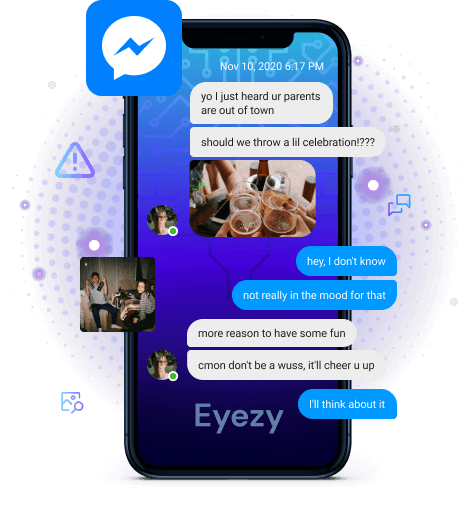
See what’s happening on Facebook Messenger
Your ticket into their conversations is right here. And you’ll be surprised what you can find out.

See their messages
Every conversation that happens in Facebook Messenger is yours to see.

Review their pics
Are they using Facebook Messenger to send and receive controversial photos? You’ll know about it.

Recognize problem chats
Whether they’re victims of cyberbullying or are being harassed, you can find out in a snap.
A world of safety.
All at your fingertips.
Eyezy is packed with everything you need to find out what’s going on in their world, wherever and whenever it’s happening.


3 easy steps to get started
-
Pick your membership
We’ve got plans for every need. Just create your account and choose the plan that’s right for your family.
-
Install Eyezy
Our Friendly Installer will show you everything you need to do to get started. We made it easy for you. And in case you need some help, our 24/7 support is always there for you!
-
Dig out the info
Log in to your Eyezy Dashboard and discover the truth about those you care about the most. Dispel any doubts in your family relationships and make wise data driven decisions.


faq
How can I monitor my child’s Facebook Messenger?
It’s as easy as pie. First, choose a subscription option and purchase a Facebook parental control app. Then, check your email for installation instructions. In the welcome letter, you’ll find a guide on how to set up Eyezy on your child's device. Once everything is installed, go to your Control Panel, find the "Facebook Messenger" tab, and learn everything you need.
How can I see who my child is chatting with on Messenger?
Simply log in to your Control Panel and open the "Facebook Messenger" tab. You’ll find all the information about your child’s chats there, including messages, photos, and videos. Remember, anyone can contact your child on Facebook Messenger, even those they aren’t friends with. That’s why it’s so important to regularly check who they’re talking to and what they’re sharing. Using Eyezy helps you maintain Facebook child safety.
How to put parental controls on Facebook if I don’t know their credentials?
It’s not necessary to know their Facebook credentials to set up Eyezy — they don’t matter at all. All you need to do is install the app directly on your child’s phone. This is a quick process that only takes a few minutes, but you will need physical access to their phone.
Can I monitor my child’s Facebook Messenger without having access to their phone?
You only need access to your kid's phone or iCloud credentials once when installing the parental control app on their device. After that, you can monitor everything right from your own device — no need to grab their phone constantly.
Will my child find out that I use a Facebook parental control app?
Not at all, because Eyezy operates in hidden mode. This means the app remains invisible during regular device use. You don’t need to worry — once you set it up on your child’s phone, they won’t notice that you’re monitoring their Facebook activity.
Can I access the chat gallery in their Facebook Messenger?
Sure! With Eyezy, you can view all chat content, including sent photos, videos, files, and voice messages. It’s always a good idea to monitor kids’ Facebook regularly, especially their chat galleries, to make sure everything is appropriate. Spotting issues early can help protect your child from countless online dangers.
Is it possible to monitor secret conversations on Facebook?
Secret conversations on Messenger can be tricky. They’re encrypted and disappear automatically. That’s why it's difficult for parents to see what’s being said. But the good news is that with Eyezy, you can see all their Facebook Messenger conversations, even ones that happened secretly.
Can I track my child's location while they use Facebook Messenger?
Yes! And it doesn’t matter whether they’re using Facebook or not. With Eyezy, you can see their location at any time. And it goes even further. If you’re worried they might go somewhere they shouldn’t, you can set up geofencing and get alerts if they enter or leave a safe or danger zone. This is a must-have feature for your peace of mind.
Should I choose a free Facebook monitoring app?
You'll definitely find plenty of free options on the internet if you type something like "monitor child's Facebook Messenger." We don’t recommend them because most free monitoring apps can cause real problems. Some may use your credit card, steal your personal information, and more. Always be careful when downloading anything from the internet. Choose only reliable apps like Eyezy, backed by user reviews and verified information.


